
Topic 202: System Startup
Kursvorgaben LPI:
Topic 202: System Startup
202.1 Customising system startup (weight: 3)
Candidates should be able to query and modify the behaviour of system services at various targets / run levels. A thorough understanding of the systemd, SysV Init and the Linux boot process is required. This objective includes interacting with systemd targets and SysV init run levels.
Key Knowledge Areas
- Systemd
- process typen
- service
- process
- hängt an der shell
- daemon
- ist entkoppelt von der shell
- commands
- list-dependencies
- cat
- start restart stop
- edit
- reload
- mask
- unmask
- enable
- disable
- revert !!
- isolate // equivalent zu runlevel
- set-default multi-user.target
- man kann die service files mergen (nach Prio) wenn man z.B. /etc/systemd/system/cups.service.d/override.conf
- Wenn man hingegen /etc/systemd/system/cups.service anlegt wirden keine Config-Daten aus dem Service File mit niedrigerer Prio geladen
- SysV init
- /etc/inittab
- /etc/rcS // Single user
- Linux Standard Base Specification (LSB)
The following is a partial list of the used files, terms and utilities
- /usr/lib/systemd/
- /etc/systemd/
- /run/systemd/
- systemctl
- systemd-delta
- /etc/inittab
- /etc/init.d/
- /etc/rc.d/
- chkconfig // Dienst auf on/off setzen
- update-rc.d // Debian spezifisch
- init and telinit
- ändern das runlevel
- runlevel zeigt aktuelles runlevl an
Beispiele
- SysV-init
- systemd
202.2 System recovery (weight: 4)
Candidates should be able to properly manipulate a Linux system during both the boot process and during recovery mode. This objective includes using both the init utility and init-related kernel options. Candidates should be able to determine the cause of errors in loading and usage of bootloaders. GRUB version 2 and GRUB Legacy are the bootloaders of interest. Both BIOS and UEFI systems are covered.
Key Knowledge Areas
- BIOS and UEFI
- UEFI
- efibootmgr -v
- UUID wird bei der FS Erstellung generiert
- PARTUUID hängt an der Partition
- /boot/efi/EFI/debian
- BIOS
- first stage vom GRUB im ersten 512 Byte Sektor der Festplatte
- NVMe booting
- GRUB version 2 and Legacy
- grub-mkconfig ist LPI relevant. grub-update ist Debian
- grub shell
- man bootparam
- man kernel-command-line
- systemd-recovery
- systemd.unit=rescue.target
- bootet etwas weiter
- systemd.unit=emergency.target
- vor dienststart
- boot loader start and hand off to kernel
- kernel loading
- hardware initialisation and setup
- daemon/service initialisation and setup
- Know the different boot loader install locations on a hard disk or removable device
- Overwriting standard boot loader options and using boot loader shells
- Use systemd rescue and emergency modes.
The following is a partial list of the used files, terms and utilities
- ipxe
- mount
- mount -av
- fsck
- inittab, telinit and init with SysV init
- The contents of /boot/, /boot/grub/ and /boot/efi/
- EFI System Partition (ESP)
- GRUB
- grub-install
- installiert seine dateien nach /boot/efi/EFI und schreibt seine variablen in den NVRAM
- efibootmgr
- UEFI shell
- initrd, initramfs
- Master boot record
- systemctl
Beispiele
- initrd
- bootloader
- Kernel Cmdline Parameters
- efibootmgr
- UEFI shell
202.3 Alternate Bootloaders (weight: 2)
Candidates should be aware of other bootloaders and their major features.
Key Knowledge Areas
- SYSLINUX, ISOLINUX, PXELINUX
- syslinux
- bootet von fat
- isolinux
- bootet von CD
- PXELINUX
- bootet über Netzwerk
- suse
- dhcp server tftp syslinux apache2 apache2-prefork
- dmidecode für boot UUID
- client server
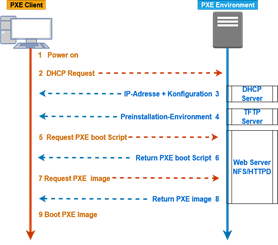
- DHCP discover ->
- DHCP offer <-
- DHCP Request ->
- DHCP Ack <- (mit IP + Filename (67))
- TFTP IP-Addr.:/Filename ->
- TFTP Liefert Datei (pxelinux) <-
- TFTP Versucht config zu laden ->
- UUID
- MAC
- IP-Teil (immer grober werdend)
- TFTP liefert dateien <-
- TFTP Request Linux ->
- TFTP Request initrd ->
- Understanding of PXE for both BIOS and UEFI
- Awareness of systemd-boot and U-Boot
- systemd-boot setzt vorraus dass es nur noch uefi gibt
The following is a partial list of the used files, terms and utilities
- syslinux
- extlinux
- isolinux.bin
- isolinux.cfg
- isohdpfx.bin
- efiboot.img
- pxelinux.0
- pxelinux.cfg/*
- uefi/shim.efi
- uefi/grubx64.efi
Beispiele
- pxe-bootserver
- shim.efi
202.1 Customising system startup
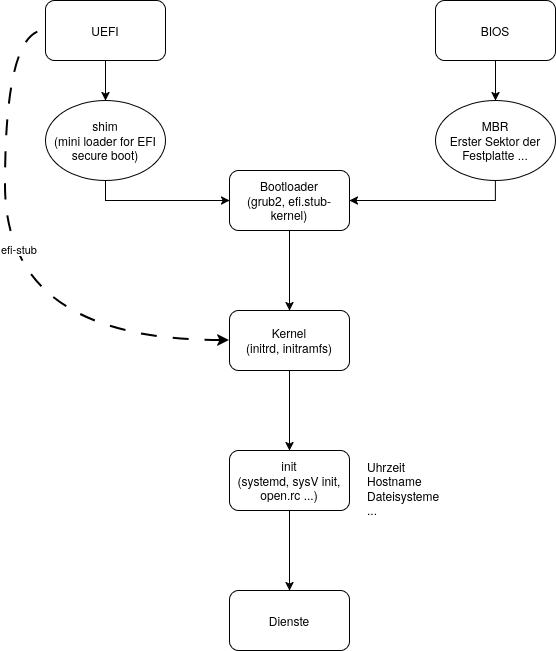
Standard Bootvorgang
UEFI → shim → Bootloader (grub2) → Kernel (initrd, initramfs) → init (systemd, SysV init …) → Dienste


In der Praxis selten: UEFI → efi-stub → Kernel → init → Dienste
BIOS → Bootloader → Kernel → init → Dienste
EFI: NVRAM auslesen mit efibootmgr -v
PARTUUID : UID der Partition
UUID : UID des Dateisystems
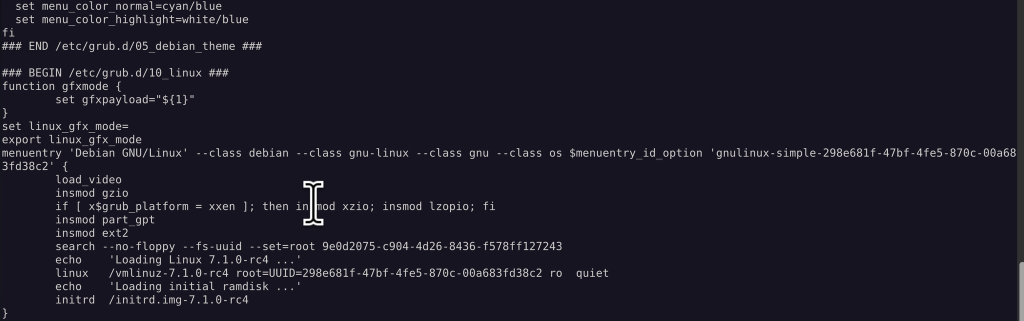
EFI Vars ist als eigener Dateisystemtyp eingehängt:
efivarfs on /sys/firmware/efi/efivars type efivarfs (rw,nosuid,nodev,noexec,relatime)SYSTEMD
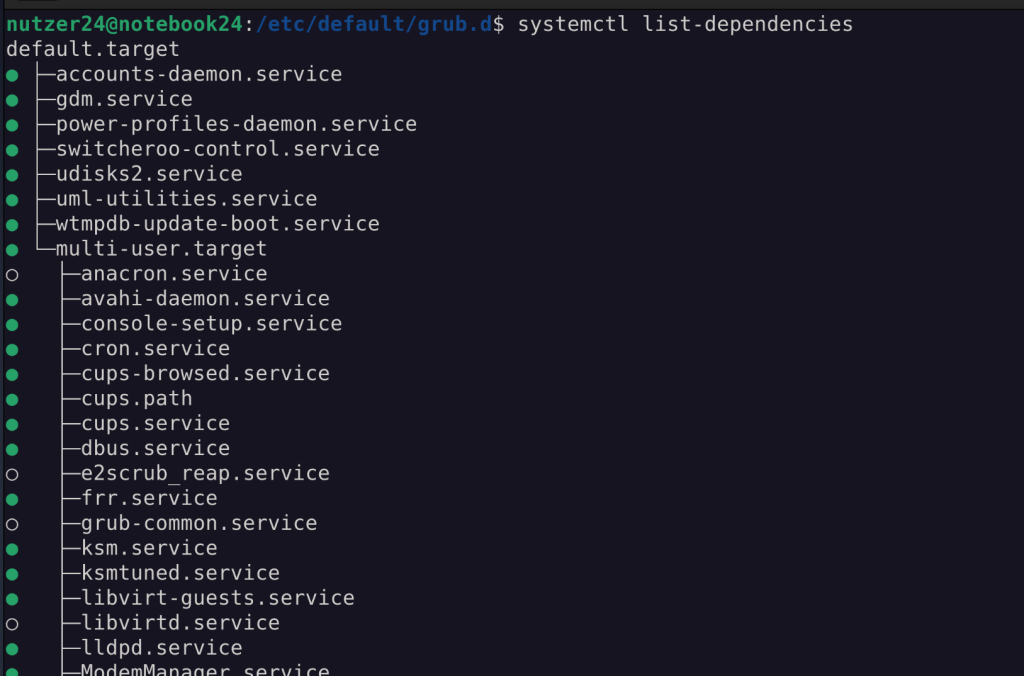
Verben für systemctl
- start
- stop
- restart
- status
- reload
- mask/umask
- edit/revert
- Erzeugt eine Overlay Konfiguration in /etc/systemd/system/[servicename].d/
- --full erzeugt eine komplette Unit Datei
- enable/disable
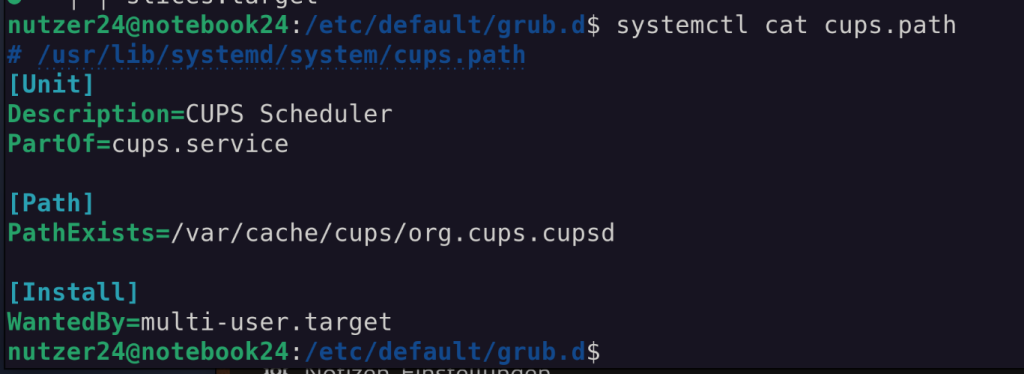
- cat
- list-dependencies
- list-units
- list-timers
- isolate (das target wechseln)
- get-default/set-default (das Standard Target ändern)
- …

Eine Path Unit sorgt über ein Ordner/Datei Objekt z.B. für den Start eines Dienstes
- Prozesse
- top
- mc
- auch: sshd
- Daemon
- Ist in der Lage im Hintergrund zu laufen
- sshd als Hintergrund Prozess
- Dienst
- Eine SystemD Unit
- Startet einen Prozess oder einen Daemon
3 Ebenen der Konfiguration von Units:
/lib/systemd/*und/usr/lib/systemd/*: (niedrigste Priorität) aus der Paketverwaltung, nicht anfassen./run/systemd/*: dynamisch von systemd erzeugt/etc/systemd/*: (höchste Priorität) Hier dürfen sich Admins austoben
Unit-Files:
- Defaults der Distribution
{/usr,}/lib/systemd/system/…{/usr,}/lib/systemd/system/….d/*.conf
- Voreinstellungen, siehe
man systemd.preset{/usr,}/lib/systemd/system-preset/
- temporär, dynamisch von systemd erzeugt
/run/systemd/…/run/systemd/….d/*.conf
- Hier dürfen sich Admins austoben
/etc/systemd/system/…/etc/systemd/system/….d/*.conf
SysV INIT
Erste Datei im init Prozess ist die /etc/inittab
Hier werden Runlevel definiert und z.B. sowas wie “was mache ich bei Strg-Alt-Entf” konfiguriert
Daraus wird das rc script gestartet, welches wiederum die Scripte aus /etc/rc[Runlevel].d ausführt. Das sind dann alles Symlinks, die in /etc/init.d/ liegen
Passende Scripte zur Verwaltung waren Distro-spezifisch. (debian : update-rc.d / RedHat : chkconfig)
Runlevel wechseln mit “telinit <neuer Runlevel>”
202.2 System recovery
Grub config
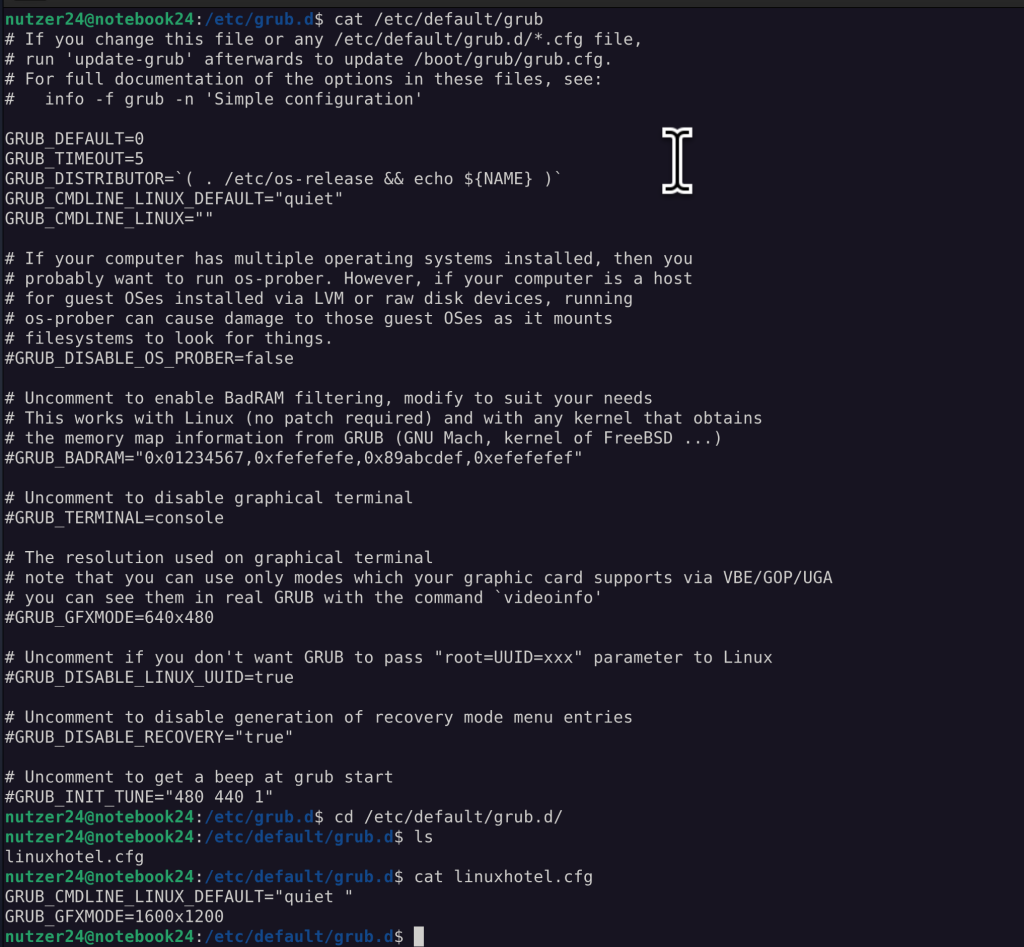
https://wiki.lab.linuxhotel.de/doku.php/lpi1:bootloader
grub-install
bei EFI: Konfiguration des Boot Parameters im EFI NVRAM
bei BIOS: Schreiben des grub in den MBR
202.3 Alternate Bootloaders
https://wiki.lab.linuxhotel.de/doku.php/lpi2:pxe-bootserver
https://wiki.syslinux.org/wiki/index.php?title=PXELINUX
dhcp Ablauf
No comments to display
No comments to display